
|
Parameter Mask for DO procedures
If a DO procedure is started with an E command, this will first be validated by JRS detecting the PROC statement in the file to be started. Further plausibility checks will then be carried out. JRS will recognise, for example, when an expected parameter (positional or keyword) has not been provided (no specification via DO-params in the E command and no standard value in the PROC statement). In this case, the user will be presented with a mask of all the parameters, together with their current values. In addition to the parameter name, comments relating to the parameters will also be displayed in the mask (up to a length of 40 bytes).
Example: If the PROC statement contains a line such as: /&FILE=TEST, "Name of the file to be processed"-
then this DO parameter will be displayed as follows:
FILE Name of the file to be processed =TEST
If the comment begins with ":", then that comment will be displayed without the parameter name.
Example: If the PROC statement contains a line such as: /&FILE, ":Name of the file to be processed"-
then this DO parameter will be displayed as follows:
Name of the file to be processed :
Normally, one line per procedure parameter is reserved in the parameter mask. This means that only parameter values of less than 40 bytes may be entered. Specifying #n (n < 4) will reserve one to three additional input fields, each of 40 bytes, for a parameter. #n must appear after the first ", or ": .
Example: If the PROC statement contains a line such as: /&FILE=TEST, ":#3Name of the file to be processed"-
then this DO parameter will be displayed as follows:
Name of the file to be processed =TEST
:
:
:
#DU | :#DU #DU will turn the input field dark.
Example: /&PASSW=, ":#DULogon Password for Userid"-
:#- #- will prevent the parameter appearing in the mask.
Example: /&PASSW=C'ABC', ":#- Logon Password not in mask"-
Notes:
The comments for the procedure parameters can be used to make the parameter mask clearer and more informative.
Procedure parameters that were not supplied at all, or only partially supplied in the DO command can be supplied in the parameter mask. Entering E in the command field of the parameter mask will start the job.
Pressing the K1 key in the parameter mask will abort the E command, i.e. the Enter job will not be started.
Entering "?" at the DO or Enter parameter field will display the parameter mask. The command E DO-proc,? or E lib (element),? can also be used if the user is purely interested in seeing an overview of the positional and keyword parameters, and their current values. To avoid starting the Enter job in this case, K1 should be pressed. The predefined or user-modified contents of the parameter mask can be saved for future use with the SP command. Use E %name to activate these parameter values.
Example:
The DO procedure DO.COB contains the following PROC statement:
/PROC N,(&MODUL, - / &COLNAS=N, "#L1" - / &COLLIST=Y, "#L1" - / &COLCOB=Y, "#L1" - / &COBOLCOMPILER=Y, "#L1" - / &COLNUMC=Y, "#L1" - / &COBLIB=$COPLIB, "Cobol-COPY-Lib" - / &COBLIB1=$COPLIB, - / &COBLIB2=$COPLIB, - / ©CLIB1=$COPLIB, "Columbus-COPY-Lib" - / ©CLIB2=$COPLIB, - / &MODLIB=MODLIB, - / &COLLISTLISTE=, - / ),SUBDTA=&
After entering
E CFS.S.LMSLIB(ASSEMB)/TIME=40,JOB-CLASS=JCBALL
the following parameter mask will be displayed:
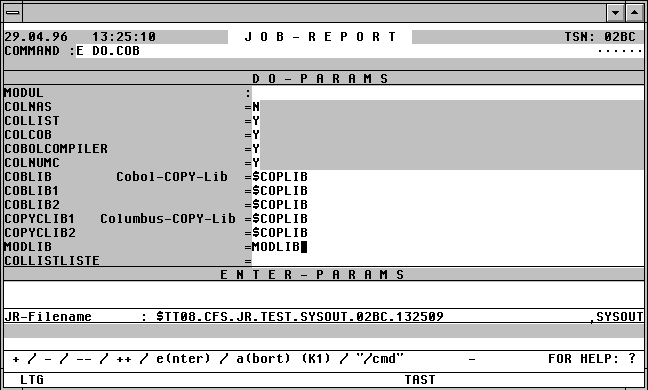

With a mouseclick you get a describtion of the screen item.
Positional parameters for the PROC statement are denoted by "=" in the parameter mask, and keyword parameters are denoted by "=" .