
|
POOL Display Volume Information from an Archive Directory
POOL [AV] [, DIR=directory] [, string] [, FILE=file] [, SORT=C|E|R|D|O [, A|D] ]
The following media information relating to entries in an Archive directory will be displayed:
VSN and device type of the media, the save version identifier, owner (Archive pool or operator), expiry date of the volume or save version, and remarks (e.g. that the tape is unusable).
AV Only available Archive volumes (VSN's) will be displayed. Available media are those not associated with an expiry date, or those whose expiry date has passed.
Default: Information on all volumes, i.e. both used and free, will be displayed.
directory Name of the Archive directory.
If the POOL command is issued from within an Archive directory file list (see pages 3- and 4-), the DIR=directory parameter can be omitted. In this case, CFS will supply the name of the directory currently being displayed.
string Only those lines from the Pool list whose contents meet the search criteria will be displayed. As well as the single search argument 'string', multiple search arguments can be constructed by using the operators */,/+ . For a full description of the construction of multiple search criteria, see page 8-.
Examples of search criteria: :1:H04246,:1:H043
'S.9412'
'OPERATOR'+'-07-'
UNUSABLE
file The POOL entries will be written to a file with the specified name. No output will go to the screen.
SORT=x[,A|D] The entries from the POOL command will be sorted on the specified criterion:
C Sort on the column "Current Use"
D Sort on the column "Device"
E Sort on the column "Exp.Date"
O Sort on the column "Owner"
R Sort on the column "Remark"
V Sort on the column "VSN"
A|D The sorting will be in ascending or descending order.
The screen produced by the POOL command looks as follows:
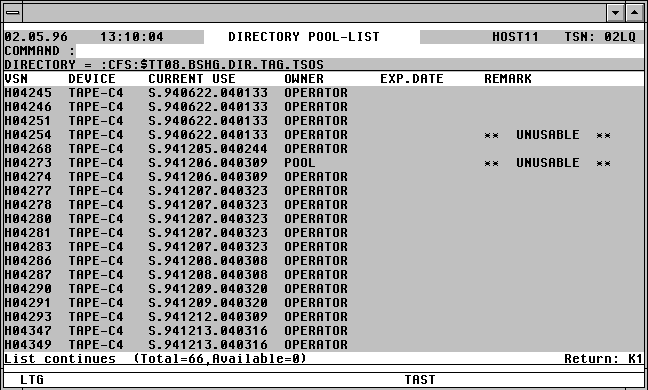

With a mouseclick you get a describtion of the screen item.