
|
10 Menu System for Connections
In the previous chapter (Chapter 9, Connections), the commands for administering Connections were presented: OC to open a Connection, CC to resume a previously opened Connection, DC to terminate a Connection, and CD to display all open Connections.
The MENUE command of CFS provides a means of accessing Connections through predefined, formatted screens. The user does not have to be familiar with the individual CFS Connection administration commands. Marking an option in a predefined mask will cause CFS to open or to resume the required Connection automatically; i.e. CFS will substitute and execute the required command.
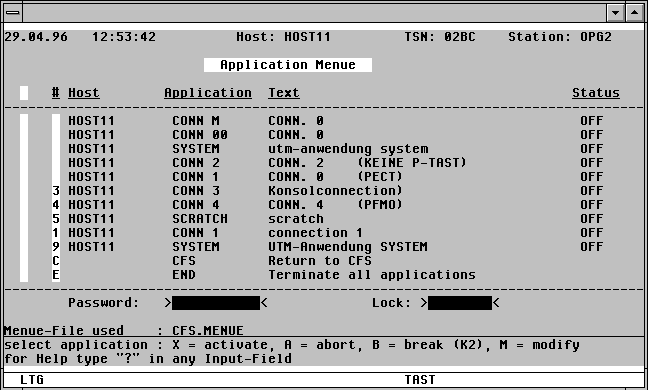

With a mouseclick you get a describtion of the screen item.
The Menu System for Connections offers the user the following facilities:
1) User-specific list of predefined Connections.
The parameters for Connections with which the user might wish to work can be stored in a so-called menu file. The Connection parameters include partner name, host system, virtual terminal name, LOGON/KDCSIGN command, and startup sequences.
In the standard Menu System mask, up to ten predefined Connections can be established. A background mask provides another ten Connections, which, if necessary, can be transfered to the main mask.
2) Marking a predefined option in the menu will open that Connection automatically, according to the parameters stored in the menu file. An automatic sequence of commands can also be executed (startup sequence), if specified. Should the marked Connection already have been opened by the user, a branch will be made to it.
3) Automatic maintenance of the Connection number. When opening a new process, the next free number will automatically be used.
4) Overview of all the Connections, whether open or not, and their status (ON/OFF). Pressing the K2 key in a Connection will automatically switch control back to the main menu mask. If the DKC (Direct K2 for Connection) mode is set, see page 9-), the user can only return to the main menu by using the escape symbol.
5) A set of P-key assignments for each process in the main menu mask can be created. Switching between the Connections will cause the respective P-key set to be reloaded.
6) The Connections predefined in the main menu mask can be changed, enhanced or reorganised by the user at any time by means of a Menu Editor. This edit facility may be restricted to privileged users.
For users unfamiliar with BS2000 and with CFS, e.g. non-technical users, the Menu System provides a unified tool for accessing the multiple Connection services offered by CFS. After the necessary preparatory work has been done, the user need only LOGON. The main menu will then be displayed, and the user can then begin processing from any relevant tasks, in parallel if desired.
The necessary preparatory work mentioned above, normally performed by the system administrator, includes the following:
a) Creating user-specific menu files, with startup sequences if required, for the various Connections.
b) Creating a LOGON-DO procedure called SYS.SDF.LOGON.USERPROC under the userid from which CFS will be called automatically when the user logs on. The prerequisite for this is SDF Version 1.4 or greater. The LOGON-DO procedure must contain the BS2000 commands to load CFS, as well as the CFS-internal command sequence up to and including the MENUE command. See Chapter 19 "Procedure Language" and Chapter 20 "CFS Startup" for further information.