
|
The Job Report mask
The Job Report mask will be displayed when an Enter job started by the Job Report System has ended. Statistical information about the job, as well as the JR file (SYSOUT, SYSLST or any other file) will be displayed.
An example of the Job Report mask for a job which was started with an E command, and which has finished, is given below.
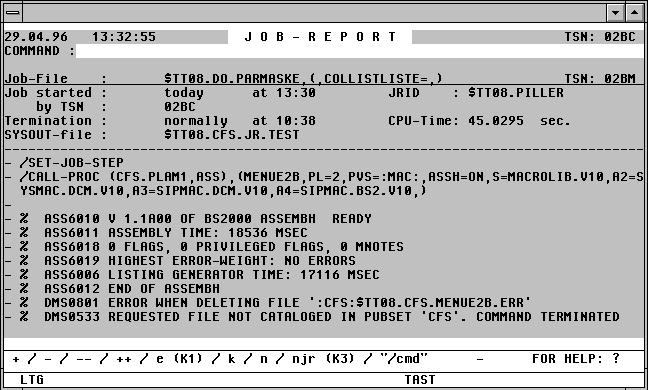

With a mouseclick you get a describtion of the screen item.
The Job Report mask contains a command field, similar to the field in the CFS file list. A number of commands can be entered here to scroll through the listing.
Possible Entries in the Job Report Mask Command Field
+ | - Scroll forward or backward by one screen (Standard: if nothing is entered, scroll forward towards the end of the listing).
+n | -n Scroll forward or backward by n records.
++ | -- Position at the beginning or end of the file.
DS | DL [DW] Display short / Display Long.
DS: Only the first 80 bytes of each record of the SYSOUT protocol is displayed.
DL (DW): Records longer than 80 bytes will wrap around to the next line (Standard).
A change to the DS/DL mode will remain in force until the end of the CFS session.
S,'string' Find and move to the first occurrence of the specified search string. If the string does not occur in the file, the cursor will be positioned at the beginning of the JR file. For a full description of the Search command syntax, see page 8-.
S Position the cursor at the next occurrence of the previously defined search string.
/cmd Execute a BS2000 command.
/ Switch to BS2000 command mode.
E | K1 End + Erase SYSOUT + ERAJV monjv.
The "inform user about the termination of the Enter job" transaction will be closed. If the JR file displays a SYSOUT protocol, this will be erased, or recataloged to a temporary file if the ERT mode is set. The Monitor Job variable is also erased. SYSLST and other JR files are not erased. For further information on the ERT mode, see page 18-.
Note:
If the user was processing a file in Format mode of EDT before displaying the Job Report mask, the original screen contents will normally have been overwritten by the Job Report mask. The original EDT screen can be restored by pressing the K3 key.
EP [x] End + Print. In addition to End, the contents of the JR file (SYSOUT, SYSLST, or any other file), are printed.
x Any variant of the Print Action Code can be specified for x .
Examples:
EPSE End + Print Space=E,Erase.
EPDnS End + Print on Device n, Space=E
For a full description of the P Action Code variants, see page 6-.
K End + Keep. The "inform user about the termination of the Enter job" transaction will be closed, but the SYSOUT protocol will not be erased.
KP [x] End + Keep + Print. In addition to Keep, the displayed JR file (SYSOUT, SYSLST, or any other file) will be printed.
x see above: Command EPx.
N No action. The display of the Job Report information will be aborted, but the "inform user about the termination of the Enter job" transaction will not be closed.
Entering N is only relevant if the mask displays information about a job that has not started, or if the display of the JR file is to be interrupted. This Job Report mask will be displayed again the next time CFS is loaded, or when the JR command is next executed. This mask will remain active until the user acknowledges it with K, E or by pressing the K1 key.
If the Job Report display is aborted with N, it will be re-displayed at the point at which it was interrupted the next time that same JR file is activated by a JR command.
The display of the JR file can thus be interrupted with an N command, and then resumed with a JR command.
Note:
Occasionally it can happen that a 0D9A DMS error occurs when trying to display the JR file in the Job Report mask. This can be overcome by pressing the DUE1 key, or by entering N (No Action) and then a JR command.
NP [x] No Action + Print. In addition to the No Action function, the displayed JR file (SYSOUT, SYSLST, or any other file) will be printed. This is analogous to the EP command, see above.
NJR | K3 No Job Report. Same as for N (No Action), but in addition, the Job Report masks for all other jobs already started will be suppressed.